Almost every company has that one file. It is called registrations_final_v3.xlsx, it lives on a shared drive, and three departments work from it. It is carefully maintained – and still the reason someone is at their desk on Friday evening.
But that file is only the most visible symptom. The real issue is a different one: every company continuously produces customer data in places that have nothing to do with each other. And somebody assembles it all by hand.
The problem sits in the back office, not in IT
A colleague maintains the registrations for the autumn dates: name, company, email, a few notes on prior experience. Then the actual work begins. The dates need to go on the website, so someone asks the agency. The contacts belong in the CRM, so they get copied across row by row. The team calendar has to match, so everything is typed a third time. When someone changes their booking, three places need updating.
Nobody is doing anything wrong here. The data is correct. It simply never reaches the places where it is needed unless somebody carries it there by hand. And that work is invisible: it appears in no project plan, because it happens on the side.
The data already exists – just scattered
The spreadsheet is only one of many starting points. In practice we keep meeting the same sources:
- Back-office lists – Excel or CSV, often grown over years, with their own conventions in the columns.
- Forms on the website – enquiries, registrations, downloads. Frequently they only arrive as email in a shared inbox.
- Trade fairs and events – the organiser's attendee list, photographed business cards, notes from a conversation at the stand.
- Existing contact folders – Outlook or Google, usually maintained personally and consolidated nowhere.
- Legacy systems – the CRM being replaced, the ERP, an Access database from a former department.
- Accounting and ERP – home to the most reliable company data in the building, because invoices have to be correct.
Every one of these sources can export, and Pipedrive can import. What is missing is the connection between them – and that is what you used to commission as a project: concept, quote, two weeks of waiting, invoice. The next time round, it started all over again. Today several routes lead there, and the simplest one is already built in.
Start with what is already built in
Before you think about additional tooling: Pipedrive covers the common case on its own. Under Tools and apps → Import data you upload an Excel or CSV file and create contacts, organisations, leads or deals in a single pass. Columns are matched automatically by their headers, and detected duplicates can be merged instead of created twice. There are even sample files showing which fields are available in the first place.
For recurring steps inside the CRM there is built-in workflow automation: pick a trigger, set a condition, define the action – from a template and without a line of code. And to collect sign-ups straight from your website, the web forms in the LeadBooster add-on create each entry in the CRM immediately.
For a one-off list this is the faster route – nothing to install, nothing to operate, no new tool in the building. Many cases end here, and that is not a compromise, it is the right size of solution.
When the built-in tools run out
The limit is reached when the import does not happen once but every week. When the data has to go beyond the CRM, into the calendar and onto the website. Or when your own rules apply that no import dialogue knows about – that a row without a company, say, is handled differently from one with.
That is where workflow automation tools such as n8n come in. They assemble workflows from ready-made blocks: read a file, check a field, create a contact through the API, write a calendar entry, send a notification. You connect the blocks on a canvas instead of writing code.
Let us be honest: this is not a casual undertaking either. Such a tool wants to be installed, operated and understood, and the first workflow costs you an afternoon. What it does is move the boundary – workflows that used to require an external project now get built in-house and changed next time by the same people, without waiting for an appointment.
How we did it ourselves
We had exactly this task in-house: an attendee list as a spreadsheet that needed to reach Pipedrive in full. For that single import, the built-in importer would have done the job. We built the workflow anyway, because it repeats and because the chain is meant to grow – with all the messiness a list grown over years brings along.
The file is uploaded through a form, then the workflow takes over:
- Every row is checked before anything is created: valid address, complete name, no duplicate within the file.
- The organisation is looked up and only created if it does not exist yet.
- The person is created with address, phone and company assignment – anyone already in the CRM is left untouched.
- Additional details from the list are attached to the contact as a note.
- A record closes the run: created, skipped, rejected – each with a row number and a reason.
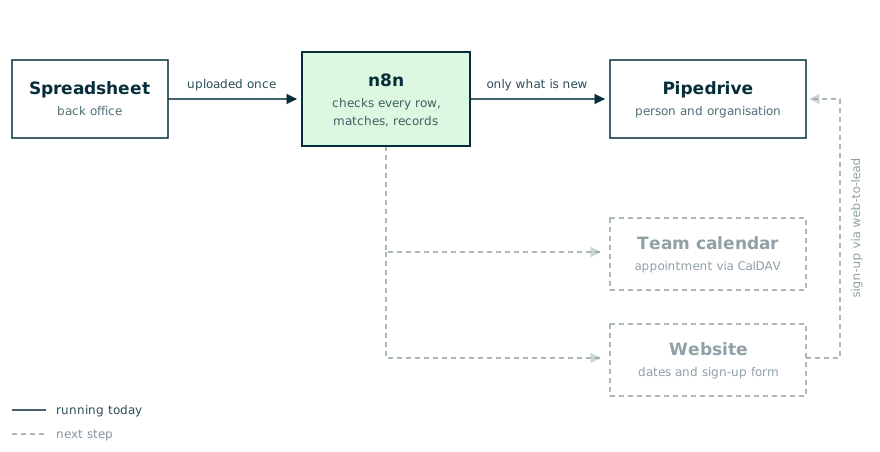
The workflow as it runs today: the list is read once, n8n checks every row and only creates what is not there yet. Calendar and website are dashed – they are the next step.
That is all this workflow does, and that is exactly the point: it is small enough for someone in-house to understand and change it. The list stays in the back office with the colleague who knows it best – it is simply read once instead of typed three times.
The next step is an obvious one and comes from the same toolbox: appointments into the team calendar via CalDAV, the dates displayed on the website, and a sign-up form whose entries flow through web-to-lead straight back into the CRM. That is when the one-way street becomes a loop. A form, a trade-fair export or a database query could just as easily sit at the start – the rest of the chain stays the same.
What actually takes the time
The import itself was built in an afternoon. The time went into the cases every real data source brings along – and those are the reason such projects otherwise get expensive:
- The same person appears twice, once correctly and once with a typo. Without a check, both end up in the CRM and nobody knows which record is the maintained one. Reliable detection needs an attribute that is genuinely unique – usually the email address, not the name.
- Companies that already exist. Two registrations from the same company must not create two organisations. It gets tricky within a single run: a company you just created is not necessarily findable through search a moment later – the workflow has to remember what it has already done itself.
- Empty fields are not the same as missing ones. An attendee without a company, a row without a phone number: many APIs reject a field passed in empty that would have been better left out entirely.
- Things fail midway. If a run stops at row 40 of 200, your data is half populated. Every workflow therefore needs a record of what happened: what was created, what was skipped, what was rejected – and why. Without it, you go looking by hand.
- The first run does not belong in your real data. Use a test system while you experiment. Skip that step and you will be removing test contacts from production afterwards – which takes longer than the test would have.
None of these points is hard. But you have to know about them. That is the difference between an afternoon and three weeks.
What carries over to other sources
The instructive part is how little of it has anything to do with spreadsheets. The part that reads the file is a single block and quickly swapped. Everything else – checking, matching, creating, recording – stays the same, whether the data comes from a form, a trade-fair export or a legacy system.
Which also means: the effort does not sit in connecting to Pipedrive, it sits in the rules. What counts as a duplicate? Which field decides? What happens to a row that does not fit? No tool answers these for you – but you answer them once, and they hold for every further source.
When this pays off
It pays off when the same data regularly has to reach more than one system, when retyping introduces errors, or when waiting for someone else is the real bottleneck.
It does not pay off for a one-off list of twenty rows – copy and paste beats any automation there. And not for processes that are not settled yet: do not automate a workflow you are going to change next week anyway.
So the most useful question upfront is not which tool is best, but how often the case occurs. Once a year: import it. Every week, into several systems: connect them.
The point is not that nobody touches a spreadsheet any more. The point is that you build the connection yourself – and next time, with the next source, you do not have to pick up the phone.